Customers running SQL Server workloads on Amazon Relational Database Service (Amazon RDS) frequently ask how to add AI capabilities to their database applications without re-architecting their stack. Until SQL Server 2022, integrating AI into database workflows required building and maintaining additional integration layers to bridge the gap between the database engine and AI services. This often meant deploying AWS Lambda functions, Amazon API Gateway endpoints, and custom application code, adding complexity, latency, and operational overhead.
SQL Server 2025 on Amazon RDS removes this middleware layer. With the new sp_invoke_external_rest_endpoint system stored procedure, you can make native HTTPS REST API calls directly from T-SQL. You can invoke Amazon Bedrock foundation models (FMs) from the same stored procedures where your business logic already lives. You control response length and cost with parameters like maxTokens directly in the call, and receive AI-powered results without leaving the database engine.
This capability extends well beyond AI. With sp_invoke_external_rest_endpoint, the same stored procedure works with Amazon Simple Notification Service (Amazon SNS), Amazon Simple Queue Service (Amazon SQS), Amazon EventBridge, and any HTTPS endpoint. Your API keys stay secure by default. Database Scoped Credentials encrypt them at rest and prevent them from surfacing in query text, plan cache, or logs. Your DBAs can build these integrations without learning new languages or deploying additional infrastructure.
The use cases are immediate and practical:
- Triage support tickets in real time — classify sentiment, urgency, and category as records arrive, without leaving SQL Server.
- Automate performance diagnostics — collect wait statistics and receive AI-generated recommendations in a single T-SQL call.
- Trigger intelligent alerts on business events — when a high-value order lands, generate an executive summary automatically.
- Build an on-demand query advisor — give any team member AI-powered database guidance without waiting in a DBA queue.
In this post, we walk through the secure credential setup, demonstrate production-ready stored procedures for each of these use cases, and explain the architectural advantages of this approach.
Solution overview
The solution uses three components:
- Amazon RDS for SQL Server 2025 — hosts the database with sp_invoke_external_rest_endpoint enabled.
- Amazon Bedrock — provides access to Claude Sonnet 4 foundation model through the REST API.
- Database Scoped Credential — stores the Bedrock API key encrypted at rest, so it doesn’t appear in query text or logs.
Architecture diagram
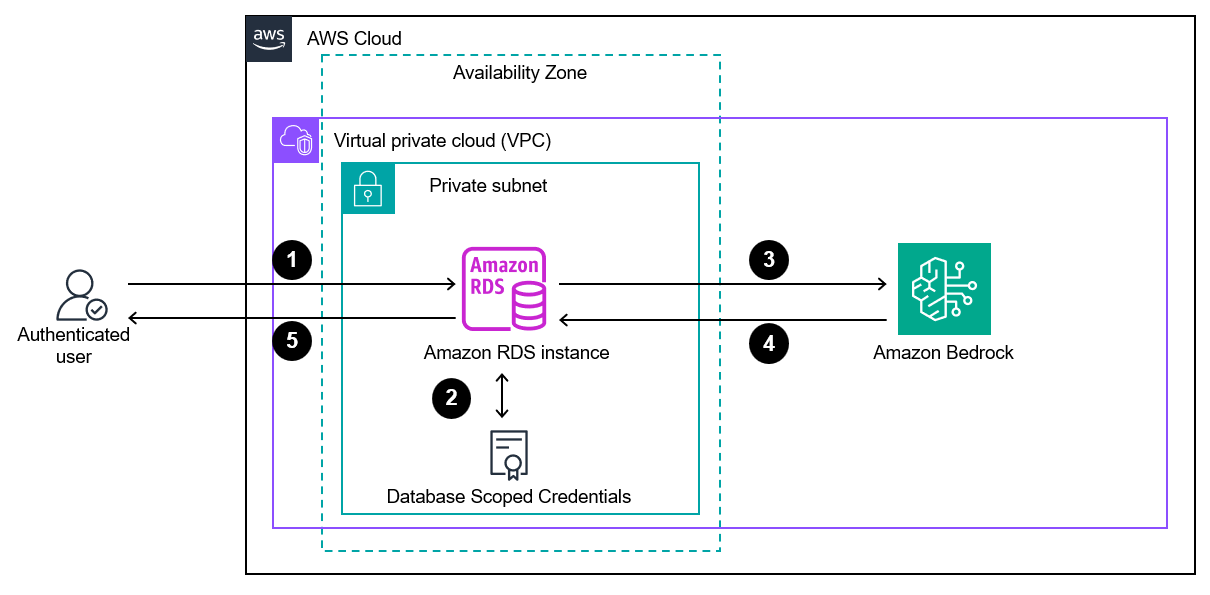
The following diagram shows the key components and data flow:
How it works
The following sequence describes the end-to-end flow:
- An authenticated user executes a stored procedure that uses sp_invoke_external_rest_endpoint.
- Amazon RDS for SQL Server retrieves the encrypted API key from the Database Scoped Credential.
- Amazon RDS for SQL Server makes an HTTPS POST request to the Bedrock Converse API.
- Amazon Bedrock processes the request using Claude Sonnet 4 and returns the response. Although this post uses the Claude Sonnet model, you can select any other model as appropriate.
- The stored procedure parses the JSON response using built-in JSON_VALUE functions and the results are returned to the user or written to a table.
Prerequisites
Before you begin, make sure that you have:
- Amazon RDS for SQL Server 2025 — instance (version 17.00 or later).
- Amazon Bedrock API key — generated from the Amazon Bedrock model catalog on the AWS Management Console. Refer to Generate an Amazon Bedrock API key using the console.
- Network connectivity — from the RDS instance to the Amazon Bedrock endpoint (bedrock-runtime.us-west-2.amazonaws.com on port 443).
- A Windows EC2 instance with SQL Server Management Studio (SSMS) installed and security group rules allowing communication with Amazon RDS.
This solution requires new AWS resources and will incur costs. Review AWS Pricing before implementation. For this post, we use the us-west-2 AWS Region. We strongly recommend testing this setup in a non-production environment and performing complete validation before production deployment.
Implementation steps
To implement the solution, connect to the Windows Amazon Elastic Compute Cloud (Amazon EC2) instance and complete the following steps:
Step 1: Enable the external REST endpoint feature
In Amazon RDS, server configuration changes are made through DB parameter groups. Run the following AWS Command Line Interface (AWS CLI) commands to create a custom parameter group, set the external REST endpoint enabled setting to 1, and apply the custom parameter group to your RDS for SQL Server instance.
Reboot the instance for the parameter change to take effect.
Step 2: Create secure credentials
To create secure credentials, connect to an RDS for SQL Server instance using SQL Server Management Studio (SSMS). Run the following T-SQL command to store the Amazon Bedrock API key in a Database Scoped Credential. This encrypts the key at rest using a master key and ensures it never appears in query text, plan cache, or trace logs.
The IDENTITY = ‘HTTPEndpointHeaders’ tells SQL Server to inject the contents of SECRET as HTTP headers on every request that uses this credential. The actual key value is encrypted and never exposed.
Step 3: Call Bedrock from T-SQL
With the secure credential in place, call Bedrock using sp_invoke_external_rest_endpoint with the @credential parameter using the following command.
Notice that the API key doesn’t appear anywhere in the T-SQL statement. It’s securely retrieved from the credential at execution time. Response can be adjusted as required.
Step 4: Build production-ready stored procedures
Wrap the Amazon Bedrock call in reusable stored procedures for common use cases.
Use case 1: AI-powered query advisor
This procedure acts as an on-demand SQL Server query advisor powered by Amazon Bedrock. When you pass a natural-language question, it invokes the Claude model through sp_invoke_external_rest_endpoint, sends your question as a conversational prompt, and returns an AI-generated recommendation directly in your result set. You get expert-level database guidance without building an external application layer.
Let’s walk through the key implementation details:
Input sanitization with REPLACE – Because we manually construct a JSON string, we must escape characters that would otherwise break the payload. The inner REPLACE(@Question, '"', '\"') escapes double quotes in the user’s input so they don’t prematurely terminate the JSON string value. The outer REPLACE(..., CHAR(10), '\n') converts newline characters into their JSON-safe escape sequence. Together, these two calls keep the payload valid JSON regardless of what the user types.
Controlling response length with maxTokens – The maxTokens parameter tells the Amazon Bedrock model the maximum number of tokens it can generate in its response. We set it to 800 to keep answers concise and control cost. In a production implementation, consider exposing this as an optional input parameter with a sensible default value. This gives callers the flexibility to request longer or shorter responses depending on their use case without modifying the procedure:
Use case 2: Automated wait stats analysis
This procedure automates performance troubleshooting by collecting the top 10 wait statistics from sys.dm_os_wait_stats and sending them to Claude through sp_invoke_external_rest_endpoint for real-time analysis. It returns both the raw wait data and AI-generated actionable recommendations in a single result set. This turns what typically requires DBA expertise into a self-service diagnostic call that any team member can run.
Use case 3: Real-time support ticket triage
This procedure enables real-time support ticket triage directly within SQL Server. It accepts a ticket subject and description, sends them to Claude through sp_invoke_external_rest_endpoint for classification, and returns structured JSON fields like sentiment, category, urgency, and summary. You can plug these outputs directly into your ticketing workflow or use them to trigger downstream automation, all without leaving the database engine.
Use case 4: Integrate with triggers for event-driven AI
This trigger demonstrates event-driven AI by executing automatically whenever a high-value order (greater than or equal to (≥) $50,000) lands in the Orders table. It calls Claude through sp_invoke_external_rest_endpoint to generate a concise executive alert with urgency and a recommended action. This turns a standard database event into an intelligent, real-time notification without any external orchestration. The TRY/CATCH block ensures the AI call never blocks or rolls back the original transaction.
Important: Always wrap external calls in triggers with BEGIN TRY/CATCH. If the external service is unavailable, the business transaction should still succeed.
Performance considerations
- Timeout: sp_invoke_external_rest_endpoint has a default timeout of 30 seconds. For AI calls, this is typically sufficient (Amazon Bedrock responds in 1–5 seconds).
- Concurrency: Each call is synchronous within its session. For high-throughput scenarios, consider queuing requests through Amazon SQS rather than calling Amazon Bedrock from every transaction.
- Error handling: Always use TRY/CATCH in triggers. A failed external call should not roll back a business transaction.
- Token expiration: Amazon Bedrock API keys from the model catalog expire after 12 hours. Automate rotation through a SQL Agent job or external scheduler.
Cleaning up
To remove the resources created in this walkthrough:
To delete the RDS instance:
Summary
In this post, we demonstrated how SQL Server 2025 on Amazon RDS can call Amazon Bedrock foundation models directly from T-SQL using sp_invoke_external_rest_endpoint. This approach removes middleware, reduces latency, and brings AI capabilities directly into database workflows.
To get started, launch an RDS for SQL Server 2025 instance, enable the external REST endpoint feature, and try the examples in this post. The complete SQL scripts are available in the accompanying repository. To learn more, see the Amazon Bedrock documentation and the Amazon RDS for SQL Server User Guide.
About the authors